Tutorial
Go through few examples.
First, import the following dependencies that we will be work with.
import numpy as np
from scipy.signal import ricker
from sweep_design import (ArrayAxis, Relation, Signal, UncalculatedSweep,
                            ApriorUncalculatedSweep, Spectrum)
from sweep_design.utility_functions import tukey_a_t
import matplotlib.pyplot as plt
Contents:
Introduction
ArrayAxis
Relation
Signal
Sweep
Spectrum
UncalculatedSweep
ApriorUncalculatedSweep
Configuration.
1. Introduction
The project was created for a simple design of sweep signal. Easy and fast way to create sweep signal. But to create a new one, we have developed a some new entities that help in creating of sweep signal.
Below representation structure of this objects in a project.

Following this diagram, we describe how to work with the library sweep-design.
2. ArrayAxis
Let’s create time axis. Start time is 0. end time is 10. sample of array 0.001
time = ArrayAxis(start=0., end=10., sample=0.001)
ArrayAxis has properties: size, actual_sample, start, end and sample
print(time.start)
print(time.end)
print(time.sample)
print(time.size)
print(time.actual_sample)
0.0
10.0
0.001
10001
0.0009999999999994458
Easy way to show information is print axis.
print(time)
start: 0.0
end: 10.0
sample: 0.001
size: 10001
calculated sample: 0.0009999999999994458
Calculated sample (time.actual_sample) - is sample taken from np.ndarray. Find common occurrence difference between neighbor of elements. The problem with floating numbers.
3. Relation
A relation instance is a representation of some mathematical functions, such as y = f(x).
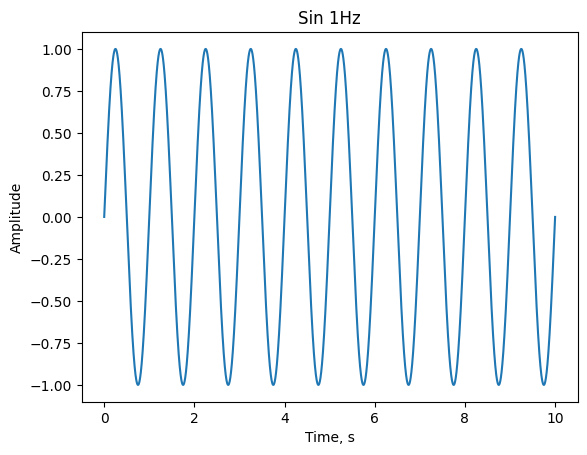
Look at building simple function of sin with frequency 1 Hz.
amplitude = np.sin(2*np.pi*time.array)
sin_1 = Relation(time, amplitude)
sin_1- instance of class Relation represent dependencies between time and
amplitude such as mathematical function
Relation instance have same properties as ArrayAxis.
Also have other properties: x, y.
We can use matplotlib to show result in next section.
r_time, r_amplitude = sin_1.get_data()
plt.plot(r_time, r_amplitude)
plt.xlabel('Time, s')
plt.ylabel('Amplitude')
plt.title('Sin 1Hz')
Text(0.5, 1.0, 'Sin 1Hz')
Also you can find maximum and minimum of relation
print(sin_1.max())
print(sin_1.min())
1.0
-1.0
Norm of function.
sin_1.get_norm()
5000.0
Interpolate of function expected by instance of Relation using new array axis
time_new = ArrayAxis(0.,10., 0.0005)
interpolate_sin_1 = sin_1.interpolate_extrapolate(time_new)
Shift relation, equal y=f(x+c) where c - is shift constant.
shifted_sin_1 = sin_1.shift(2)
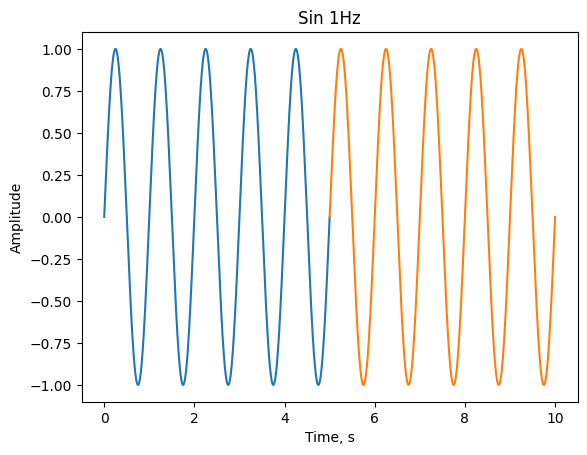
Also you can select interesting segment of data using to methods, select_data method or use square brackets.
r_time, r_amplitude = sin_1.get_data()
plt.plot(*sin_1.select_data(0., 5.).get_data())
plt.plot(*sin_1[5.:10.].get_data())
plt.xlabel('Time, s')
plt.ylabel('Amplitude')
plt.title('Sin 1Hz')
Text(0.5, 1.0, 'Sin 1Hz')
cumulative integration and differentiation of function
time_5 = ArrayAxis(-5., 5., 0.001)
y2 = Relation(time_5, time_5.array**2)
diff_y2 = y2.diff()
integration_y2 = y2.integrate()

plt.plot(*y2.get_data())
plt.plot(*diff_y2.get_data())
plt.plot(*integration_y2.get_data())
plt.xlabel('Time, s')
plt.ylabel('Amplitude')
plt.title('Functions')
Text(0.5, 1.0, 'Functions')

exponent of function. $\( y = f(x) \)\( \)\( r = e^y \)$ equal:
r = sin_1.exp()
With instance of class Relation we can use different mathematical operations
(+, -, *, /, **, +=, -=, /=, *=).
Operation can be with other instance of class Relation or numbers.
Next examples with number. Subtraction constant from sin_1.
sub_sin_1 = sin_1-0.5
plt.plot(*sub_sin_1.get_data())
plt.xlabel('Time, s')
plt.ylabel('Amplitude')
plt.title('Sin 1Hz')
Text(0.5, 1.0, 'Sin 1Hz')

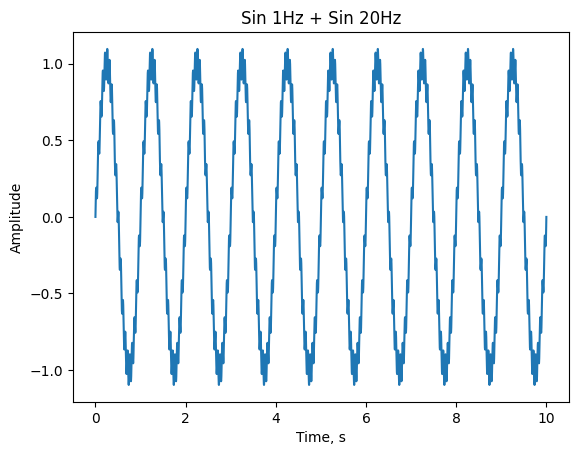
To demonstrate operation with other Relation instance, let’s create other sin
function with 20Hz. And summing two instances sin_1 and sin_20.
sin_20 = Relation(time, 0.1*np.sin(time.array*2*np.pi*20))
sum_sin1_sin20 = sin_1 + sin_20

r_time_1_20, r_amplitude_1_20 = sum_sin1_sin20.get_data()
plt.plot(r_time_1_20, r_amplitude_1_20)
plt.xlabel('Time, s')
plt.ylabel('Amplitude')
plt.title('Sin 1Hz + Sin 20Hz')
Text(0.5, 1.0, 'Sin 1Hz + Sin 20Hz')
It’s better if you use a Relation instance with an equal axis array, but sometimes you can’t use. Then, when calculating math operation, new array axis found small sample and big boundaries. And y component of each relation interpolate with new common axis and extrapolate by zeros. After that, execute mathematical operation and return the result.
time1 = ArrayAxis(0., 7.5, 0.005)
time2 = ArrayAxis(2.5, 10., 0.001)

new_sin_1 = Relation(time1, np.sin(time1.array*2*np.pi))
new_sin_20 = Relation(time2, 0.1*np.sin(time2.array*2*np.pi*20))

new_sum_sin1_sin20 = new_sin_1 + new_sin_20

plt.plot(*new_sum_sin1_sin20.get_data())
plt.xlabel('Time, s')
plt.ylabel('Amplitude')
plt.title('New Sin 1Hz + Sin 20Hz')
Text(0.5, 1.0, 'New Sin 1Hz + Sin 20Hz')

To find two common axis for relations use class method equalize. This method
use for math operations, convolution and correlations.
common_new_sin_1, common_new_sin_20 = Relation.equalize(new_sin_1, new_sin_20)
Available class methods to correlate and convolve.
Look on convolution triangle and rectangle.
x = ArrayAxis(-1., 1., 0.001)

triangle = Relation(x, -1*(np.abs(x.array)-1))
rectangle = Relation(x, np.ones(x.size))

convolution = Relation.convolve(triangle, rectangle)

figure, axis = plt.subplots(2, 1, constrained_layout=True)

axis[0].plot(*triangle.get_data(), label='triangle')
axis[0].plot(*rectangle.get_data(), label='rectangle')
axis[0].set_title("figures")
axis[0].set_xlabel("X")
axis[0].set_ylabel("Y")
axis[0].legend()


axis[1].plot(*convolution.get_data())
axis[1].set_xlabel('X')
axis[1].set_ylabel('Convolution')
axis[1].set_title('Result Convolution')
Text(0.5, 1.0, 'Result Convolution')

4. Signal
The class Signal inherited from the class Relation.
It has the same operation as Relation class. Additional has operation to
convert signal to spectrum.
List additional methods:
signal_sin_1 = Signal(sin_1)
signal_sin_1.get_spectrum()
signal_sin_1.get_amplitude_spectrum()
signal_sin_1.get_phase_spectrum()
signal_sin_1.get_reverse_signal()
signal_sin_1.add_phase(signal_sin_1)
signal_sin_1.sub_phase(signal_sin_1)
<sweep_design.signal.Signal at 0x7f53fd9ec910>
and has properties: time and amplitude
print(signal_sin_1.time)
print(signal_sin_1.amplitude)
start: 0.0
end: 10.0
sample: 0.001
size: 10001
calculated sample: 0.0009999999999994458
[ 0.00000000e+00  6.28314397e-03  1.25660399e-02 ... -1.25660399e-02
 -6.28314397e-03 -2.44929360e-15]
Let’s check that the sum of sin 1 Hz and 20 Hz has an amplitude spectrum of 1 Hz and 20 Hz.
signal_sum_sin1_sin20 = Signal(sum_sin1_sin20)
plt.plot(*signal_sum_sin1_sin20.get_amplitude_spectrum()[0:50].get_data())
plt.xlabel('Frequency, Hz')
plt.ylabel('Amplitude')
plt.title('Amplitude spectrum Sin 1Hz + Sin 20Hz')
Text(0.5, 1.0, 'Amplitude spectrum Sin 1Hz + Sin 20Hz')

Where an operation with signal is expected, the spectrum instance will be converted to signal instance and operation will be with them.
5. Spectrum
The Spectrum class inherited from Relation class.
It has the same operation as Relation class. Additional has operation to
convert spectrum to signal.
List additional methods:
spectrum_sum_sin1_sin20 = signal_sum_sin1_sin20.get_spectrum()
spectrum_sum_sin1_sin20.get_amp_spectrum()
spectrum_sum_sin1_sin20.get_phase_spectrum()
spectrum_sum_sin1_sin20.get_reverse_filter()
spectrum_sum_sin1_sin20.add_phase(spectrum_sum_sin1_sin20)
spectrum_sum_sin1_sin20.sub_phase(spectrum_sum_sin1_sin20)
<sweep_design.spectrum.Spectrum at 0x7f53fac50290>
Class method get_spectrum_from_amp_phase
amplitude_spectrum = spectrum_sum_sin1_sin20.get_amp_spectrum()
phase_spectrum = spectrum_sum_sin1_sin20.get_phase_spectrum()

spectrum = Spectrum.get_spectrum_from_amp_phase(amplitude_spectrum, phase_spectrum)
Where an operation with spectrum is expected, the signal instance will be converted to spectrum instance and operation will be with them.
6. Sweep
The Sweep class represent of sweep function. Sweep inherited from the Signal class.
And the Sweep class has the same methods as Signal class.
Also Sweep instance has next properties:
frequency_time - frequency modulation
amplitude_time - amplitude modulation
spectrogram - spectrogram of sweep signal. Expected by class
Spectrograma_prior_signal - the signal from which the sweep signal created, or None.
If create sweep instance directly from some signal, then frequency_time and amplitude_time functions
will be calculated using hilbert transformation from scipy.
How properties look in the following sections.
7. UncalculatedSweep
UncalculatedSweep is class to create Sweep instance.
The construction of a sweep signal is carried out according to the formula:
where \(t\) is the time that varies within \([0, T]\) \(A(t)\) is the sweep amplitude change function, \(\theta(t)\) is the angular sweep, \(\theta_0\) is the initial phase
where \(F(t)\) - frequency versus time
UncalculatedSweep take three parameters:
time,
amplitude_time function or amplitude modulation,
frequency_time function or frequency modulation,
Analytic functions (frequency_time and amplitude_time) can be as array
of numbers or as callable object(lambda function, common python functions and ect.)
Example: frequency_time = lambda t: t*10+1, amplitude_time = lambda t: np.ones(t.size)
time is ArrayAxis, or np.ndarray (array of numbers), or None
To get instance of Sweep, we should call instance of UncalculatedSweep with
a new or same time axis or with None. If we call with None, function tries to
use time when we created instance UncalculatedSweep. If time was is not found
then an exception will raised.
time_sweep = ArrayAxis(0.,10.,0.001)
unsw = UncalculatedSweep(time_sweep, lambda time: 10*time+1, lambda time: np.ones(time.size))
linear_sweep = unsw()

plt.plot(*linear_sweep.get_data())
plt.xlabel('Time, s')
plt.ylabel('Amplitude')
plt.title('Linear sweep')
Text(0.5, 1.0, 'Linear sweep')

Show function time frequency:
plt.plot(*linear_sweep.frequency_time.get_data())
plt.xlabel('Time, s')
plt.ylabel('Frequency, Hz')
plt.title('Frequency function')
Text(0.5, 1.0, 'Frequency function')

Show function amplitude time:
plt.plot(*linear_sweep.amplitude_time.get_data())
plt.xlabel('Time, s')
plt.ylabel('Amplitude')
plt.title('Amplitude function')
Text(0.5, 1.0, 'Amplitude function')

Image of Spectrogram:
time_spectrogram = linear_sweep.spectrogram.time
frequency_spectrogram = linear_sweep.spectrogram.frequency
extent = [
    time_spectrogram.start,
    time_spectrogram.end,
    frequency_spectrogram.start,
    frequency_spectrogram.end
]
plt.xlabel("Time, s")
plt.ylabel("Frequency, Hz")
plt.title("Spectrogram linear sweep")
plt.imshow(linear_sweep.spectrogram.spectrogram, extent=extent, aspect='auto')
<matplotlib.image.AxesImage at 0x7f53fa7b26d0>

Next example.
As a change in frequency over time, we take the function:
where \(t\) - time
It is described below as a function f_t.
As a change in the amplitude envelope with time, we take the Tukey window function, in N samples
where \(n\) - sample, \(N\) - total samples, \(\alpha\) - coefficient from 0 to 1
By using the tukey function from the scipy library.
Specifying the number of samples as the length of the array along the
time axis and taking \(\alpha\) = 0.3.
It is described below as a function of a_t.
def f_t(time: np.ndarray) -> np.ndarray:
    return (np.sin(time * 2 * np.pi / 2) + 1) / 2 * 9 + 1


usw = UncalculatedSweep(time=time_sweep, frequency_time=f_t, amplitude_time=tukey_a_t(time_sweep.array, 1))
sw = usw()


plt.plot(*sw.get_data())
plt.xlabel('Time, s')
plt.ylabel('Amplitude')
plt.title('Linear sweep')
Text(0.5, 1.0, 'Linear sweep')

plt.plot(*sw.frequency_time.get_data())
plt.xlabel('Time, s')
plt.ylabel('Frequency, Hz')
plt.title('Frequency function')
Text(0.5, 1.0, 'Frequency function')

plt.plot(*sw.amplitude_time.get_data())
plt.xlabel('Time, s')
plt.ylabel('Amplitude')
plt.title('Amplitude function')
Text(0.5, 1.0, 'Amplitude function')

time_spectrogram = sw.spectrogram.time
frequency_spectrogram = sw.spectrogram.frequency
extent = [
    time_spectrogram.start,
    time_spectrogram.end,
    frequency_spectrogram.start,
    frequency_spectrogram.end
]
plt.xlabel("Time, s")
plt.ylabel("Frequency, Hz")
plt.title("Spectrogram sin sweep")
plt.imshow(sw.spectrogram.spectrogram, extent=extent, aspect='auto')
<matplotlib.image.AxesImage at 0x7f53fa6cc910>

8. ApriorUncalculatedSweep
Construction of a sweep signal from a priori data.
There is another possibility of building a sweep signal using a priori data.
To do this, you need to use the ApriorUncalculatedSweep class. This class
inherits from UncalculatedSweep.
The difference lies in the arguments it takes to construct an instance of the class:
The first argument time is responsible for a time.
The second argument is responsible for a priori data, it can be an instance of a class:
Relation,Signal,SpectrumorSweep.The third argument is responsible for the method (function), with the help of which functions or sequences of frequency versus time and amplitude versus time will be extracted.
The extracted functions (amlitude_time, frequency_time) will then be
passed to the superclass UncalculatedSweep.
Further calling an instance of the ApriorUncalculatedSweep class
is similar to calling an instance of the UncalculatedSweep class,
which returns an instance of the Sweep class.
Consider an example of obtaining a sweep signal from a Reeker impulse.
We will also use the function to receive a signal from the scipy library.
time_ricker = ArrayAxis(0., 1., 0.0002)
amplitude_ricker = ricker(time_ricker.size, a=2)
ricker_signal = Signal(time_ricker, amplitude_ricker)
plt.plot(*ricker_signal[0.475:0.525].get_data())
plt.xlabel('Time, s')
plt.ylabel('Amplitude')
plt.title('Ricker signal')
Text(0.5, 1.0, 'Ricker signal')

time_sweep_2 = ArrayAxis(0.,10., 0.0002)
usw2 = ApriorUncalculatedSweep(time=time_sweep_2, a_prior_data=ricker_signal)
sw2 = usw2()
The ftat_method parameter is optional. The default function
is simple_freq2time from Config class sweep_design.config
def simple_freq2time(spectrum: 'Spectrum') -> Tuple[np.ndarray, np.ndarray, np.ndarray]:
    f, A = spectrum.get_amp_spectrum().get_data()
    n_spec = A ** 2
    nT = np.append([0.], ((n_spec[1:]+n_spec[:-1])/(f[1:]-f[:-1])).cumsum())
    coef = integrate.trapz(n_spec, f)
    a_t = sqrt(coef*2)*np.ones(len(nT))
    return nT, f, a_t
plt.plot(*sw2.get_data())
plt.xlabel('Time, s')
plt.ylabel('Amplitude')
plt.title('Sweep-signal')
Text(0.5, 1.0, 'Sweep-signal')

aprior_signal = sw2.a_prior_signal
plt.plot(*aprior_signal[.475:.525].get_data())
plt.xlabel('Time, s')
plt.ylabel('Amplitude')
plt.title('A prior signal')
Text(0.5, 1.0, 'A prior signal')

The result is a non-linear sweep signal whose amplitude spectrum is similar to the amplitude spectrum of the transmitted spectrum of the Reeker signal.
You can verify this by using the execution of sequences of functions:
On instances of the
SweepandSignalclasses, which are sw2 and aprior_signal, you can call theget_amplitude_spectrum()method, which returns an instance of the classRelationdescribing the amplitude spectrum of the signals.And finally, as in the previous examples, retrieve the data using the
get_data()method and pass the result to theplt.plot()method
norm_sweep = sw2.get_norm()
freq_f_t2, amp_f_t2 = sw2.get_amplitude_spectrum().get_data()
plt.plot(freq_f_t2, amp_f_t2, label="Sweep from Ricker")
freq_f_t3, amp_f_t3 = ricker_signal.get_amplitude_spectrum().get_data()
plt.plot(freq_f_t3, amp_f_t3, label="Ricker")
plt.xlabel('Frequency, Hz')
plt.ylabel('Amplitude')
plt.title('Amplitude Spectrum')
plt.legend()
<matplotlib.legend.Legend at 0x7f53fa6fccd0>

9. Config
If you don’t like default methods that calculated new parameters, you can
override the methods in the Config and the ConfigSweep classes, which
are located in the sweep_design.config module. See API References. for
more information.
Next section you can find examples of prepared sweep.
10. Utility functions and prepared sweeps
Module sweep-design.utility_functions contains functions:
tukey_a_t- for amplitude modulation.get_IMFs_ceedmanandget_IMFs_emd- empirical mode decomposition.f_t_linear_arrayandf_t_linear_function- linear frequency modulation.proportional_freq2timeanddwell- extractor frequency modulation and amplitude modulation fromSpectrum.correct_sweep- correction sweep for displacement.get_correction_for_source- correction sweep for displacement using limitation of source.
Module sweep-design.prepared_sweep contains functions to create sweep:
get_dwell_sweep- extract dwell sweep signal from a priorSpectrum.get_linear_sweep- get_linear_sweep from a priorSpectrumget_shuffle- get shuffle sweep.get_code_sweep_segments- get sweep by composing sweep signal in sequence of set code.get_convolution_sweep_and_code- get sweep by correlate sweep and code.get_m_sequence_code,get_relation_m_sequence- m-sequence code.get_code_zinger,get_code_zinger_relation- extract zinger code.